비디오의 배율을 알아내보자.
시작하기 전에
유튜브 링크를 통해 받아온 동영상에 대한 배율을 보여주는 기능을 새로 추가하게 되었다.
원본 영상이 파일로 저장이 되기는 하지만, 그에 대한 정보를 일일이 확인해야 한다면..말 그대로 최악이다.
그래서 애플리케이션 내부에서 비디오 정보를 알아내도록 해야했다.
구현방법
useEffect(() => {
    const videoElement = videoRef.current;

    const handleMetaDataLoad = () => {
		  setWidth(videoElement.videoWidth);
		  setHeight(videoElement.videoHeight);
		};

		videoElement.addEventListener("loadedmetadata", handleMetaDataLoad);

    return () => {
        videoElement.removeEventListener("loadedmetadata", handleMetaDataLoad);
    };
  }, [videoRef]);

return (
<>
	<video ref={videoRef}>
	  <source src="output.mp4" type="video/mp4" />
	</video>
	{width === 0 && height === 0 ? null : <Pixel \(darkMode={darkMode}>{`\){width}*${height}`}</Pixel>}
</>
)
loadedmetadata 라는 이벤트를 이용해서 비디오나 이미지 같은 미디어가 로드가 되면handleMetaDataLoad 함수를 이용해서 width,height를 업데이트해서 화면에 보여주면 된다.
현재는 동영상에 대한 정보를 얻어야 하기 때문에 그에 대한 width,height가 필요하다. 그러면 이걸 어떻게 얻어낼까?
동영상의 width, height 알아내기
문서에 나와있는 것처럼 이름 그대로 width , height 를 이용하려고 하니, 아예 빨간줄로 그어져 있어서 이것들은 deprecated 된 것 같다. 그래서 videoWidth , videoHeight 를 이용하기로 했다.
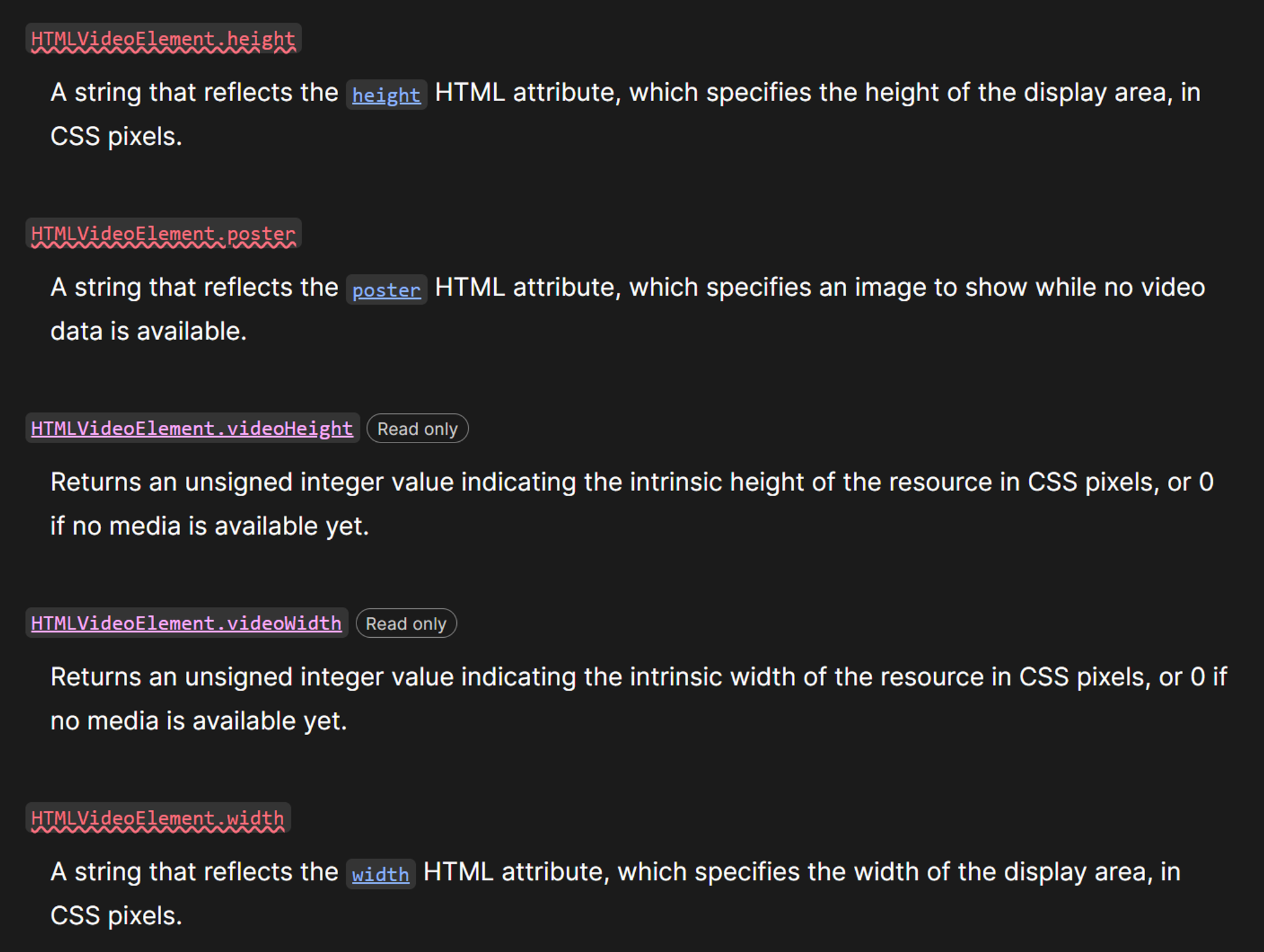
그런데 앞서 useRef 를 통해 얻어온 videoElement 를 확인해보면 다음과 같이 나온다.
<video src="xxxxxx.webm"><source src="output.mp4" type="video/mp4"></video>
여기서는 아무리 봐도 videoWidth , videoHeight 속성이 존재하지 않는다. 그러면 문서에 나와있는 것처럼 어떻게 이 속성들을 얻어낼 수 있는걸까?
videoHeight 에 대한 문서를 확인해보니 다음과 같이 나와있었다.
The [HTMLVideoElement](<https://developer.mozilla.org/en-US/docs/Web/API/HTMLVideoElement>) interface's read-only **videoHeight** property indicates the [**intrinsic height**](<https://developer.mozilla.org/en-US/docs/Web/API/HTMLVideoElement/videoHeight#about_intrinsic_width_and_height>) of the video, expressed in CSS pixels. In simple terms, this is the height of the media in its natural size.
즉, 비디오가 가지고 있는 고유 속성이다.
interface HTMLVideoElement extends HTMLMediaElement {
    readonly videoHeight: number;
    readonly videoWidth: number;
}
참고로 TypeScript에서는 위와 같이 구현이 되어있다.
다른 방법은 없을까?
useEffect 사용을 최소화하기 위해 관련 코드를 없애고 video 태그 내부에서 onLoadedMetadata 를 호출하는 방식으로 바꿨다.
이 이벤트를 이용하면 event에서 videoWidth와 videoHeight를 바로 얻어낼 수 있기 때문에 좀 더 코드를 간결하게 짤 수 있다.
const [width, setWidth] = useState(0);
const [height, setHeight] = useState(0);

const handleMetaDataLoad = (event) => {
  const { videoWidth, videoHeight } = event.target;
  setWidth(videoWidth);
  setHeight(videoHeight);
};

return (
  <video
	 onLoadedMetadata={handleMetaDataLoad}>
    <source src="output.mp4" type="video/mp4" />
  </video>
)
Reference
https://developer.mozilla.org/ko/docs/Web/API/HTMLVideoElement


